As an administrator, sure enough, if exhausting, in some cases a large number of computers that are in LAN network should be shutdown, and we must do it one by one with about how to direct each computer. Here are the steps to avoid the exhaustion of these:
1. Click the Start menu, Run.
2. From Run box, type shutdown-i, and press Enter or click Ok
3. When the Remote Shutdown active window, click the Browse button to see a list of computers that are in the network. Can also directly or click the Add button and fill in with the computer name or IP address. We will be able to select more than one computer.
4. Under What do you want these computers to do, select Shutdown, Restart or Logoff adjust to the needs.
5. Click Warn users of these action and Warning Display for the content to display warnings to users during the process of Shutdown in progress.
6. Select a list of the Option in accordance with the reasons we do this remotely shutdown.
7. Comment may also fill in as additional information.
8. Click Ok to start a remote shutdown.
9. Shortly after we click Ok button, the computer monitors the entry in the list of remote shutdown message will appear with a countdown timer.
Note: We can only perform a remote shutdown on the computer if we have administrator access rights on the computer.
Sunday, March 1, 2009

How to Optimize Windows
There are many ways to mengoptimalisasi windows we used, are as follows.
1. Turn off / Disable Indexing Services
Indexing Services is a small program but use the large memory computer lumayan. Disrupt computer can sometimes be more noise in the ring or disk access. Indexing Services is a function to update the list of computer files, the aim to speed up PC performance with the system of registration index file. If you do not need search a file too often, Indexing Services can be disabled with:
Go to Start
Click Settings
Click Control Panel
Double-click Add / Remove Programs
Click the Add / Remove Window Components
Uncheck the Indexing services
Click Next
2. Optimise Display Settings with lower-level image
Windows desktop look cool indeed interesting. But too many images will memaka source resource system. To turn off:
Go to Start
Click Settings
Click Control Panel
Click System
Click Advanced tab
In the Performance tab click Settings
Leave only the following ticked:
Show Shadows under menus
Show Shadows under the mouse pointer
Show translucent selection rectangle
Use the drop Shadows for icons labels on the desktop
Use visual styles on windows and buttons
3. SpeedUp Folder Browsing speed or folder browser
Each time you open a folder browser, but looks a little lag or delay. Karen Windows XP will find the right file and network printer while opening Windows Explorer. To fix you can turn off the facility with:
Open My Computer
Click on Tools menu
Click on Folder Options
Click on the View tab.
Uncheck the Automatically search for network folders and printers check box
Click Apply
Click Ok
Reboot your computer
4th Improve system memory
Software cacheman or cache manager can help improve memory management, such as the disk cache and a number of settings for the computer.
Go to Show Wizard and select All
Run all the Wizards by selecting Next or Finished until you are back to the main menu. Use the defaults unless you know exactly what you are doing
Exit and Save Cacheman
Restart Windows
5. Optimise your internet connection
Use software http://www.speedguide.net/files/TCPOptimizer.exe / TCP / IP Optimizer. Install the program, and select settings such as internet connection speed broadband modem or in the number of kbps. Click the network adapter and select the connection interface, and automatically optimize settings for TCPoptimizer. Do not forget to restart your computer
Download and install
Click the General Settings tab and select your Connection Speed (Kbps)
Click Network Adapter and choose the interface you use to connect to the Internet
Check Optimal Settings then Apply
Reboot
5. Optimise your internet connection
Use software http://www.speedguide.net/files/TCPOptimizer.exe / TCP / IP Optimizer. Install the program, and select settings such as internet connection speed broadband modem or in the number of kbps. Click the network adapter and select the connection interface, and automatically optimize settings for TCPoptimizer. Do not forget to restart your computer
Download and install
Click the General Settings tab and select your Connection Speed (Kbps)
Click Network Adapter and choose the interface you use to connect to the Internet
Check Optimal Settings then Apply
Reboot
6th Run BootVis - Improve Boot Times
This software helps some settings in Windows. You just download and try to trace, then the program will try several times to complete the settings and reboot lakuka. Below is a description for BootVis and software pemakaiannya:
Download and Run
Select Trace
Select Next Boot and Driver Trace
A Trace Repetitions screen will appear, select Ok and Reboot
Upon reboot, BootVis will automatically start, analyze and log your system's boot process. When it's done, in the menu go to Trace and select Optimize System
Reboot.
When your machine has rebooted wait until you see the Optimizing System box appear. Be patient and wait for the process to complete
7. Remove the Desktop Picture / dispose the image on the desktop
The back of the Windows desktop is generally given as a background image. Should not be used because it will slow the computer operating system.
Right click on Desktop and select Properties
Select the Desktop tab
In the Background window select None
Click Ok
8.Remove Fonts for Speed, buang font that does not need to
When you need the font on the computer, this may not be necessary. But if you do not need the font, try to review whether the computer has too many fonts. Because some programs that use the font will make the loading on a very large font. You can membackup the name of the font file you while not in use. Then you dispose of the font file does not need to:
Open the Control Panel
Open Fonts folder
Move fonts you do not need to a temporary directory (eg C: \ FONTBKUP?) Just in case you need or want to bring a few of them back. The more fonts you uninstall, the more system resources you will gain.
1. Turn off / Disable Indexing Services
Indexing Services is a small program but use the large memory computer lumayan. Disrupt computer can sometimes be more noise in the ring or disk access. Indexing Services is a function to update the list of computer files, the aim to speed up PC performance with the system of registration index file. If you do not need search a file too often, Indexing Services can be disabled with:
Go to Start
Click Settings
Click Control Panel
Double-click Add / Remove Programs
Click the Add / Remove Window Components
Uncheck the Indexing services
Click Next
2. Optimise Display Settings with lower-level image
Windows desktop look cool indeed interesting. But too many images will memaka source resource system. To turn off:
Go to Start
Click Settings
Click Control Panel
Click System
Click Advanced tab
In the Performance tab click Settings
Leave only the following ticked:
Show Shadows under menus
Show Shadows under the mouse pointer
Show translucent selection rectangle
Use the drop Shadows for icons labels on the desktop
Use visual styles on windows and buttons
3. SpeedUp Folder Browsing speed or folder browser
Each time you open a folder browser, but looks a little lag or delay. Karen Windows XP will find the right file and network printer while opening Windows Explorer. To fix you can turn off the facility with:
Open My Computer
Click on Tools menu
Click on Folder Options
Click on the View tab.
Uncheck the Automatically search for network folders and printers check box
Click Apply
Click Ok
Reboot your computer
4th Improve system memory
Software cacheman or cache manager can help improve memory management, such as the disk cache and a number of settings for the computer.
Go to Show Wizard and select All
Run all the Wizards by selecting Next or Finished until you are back to the main menu. Use the defaults unless you know exactly what you are doing
Exit and Save Cacheman
Restart Windows
5. Optimise your internet connection
Use software http://www.speedguide.net/files/TCPOptimizer.exe / TCP / IP Optimizer. Install the program, and select settings such as internet connection speed broadband modem or in the number of kbps. Click the network adapter and select the connection interface, and automatically optimize settings for TCPoptimizer. Do not forget to restart your computer
Download and install
Click the General Settings tab and select your Connection Speed (Kbps)
Click Network Adapter and choose the interface you use to connect to the Internet
Check Optimal Settings then Apply
Reboot
5. Optimise your internet connection
Use software http://www.speedguide.net/files/TCPOptimizer.exe / TCP / IP Optimizer. Install the program, and select settings such as internet connection speed broadband modem or in the number of kbps. Click the network adapter and select the connection interface, and automatically optimize settings for TCPoptimizer. Do not forget to restart your computer
Download and install
Click the General Settings tab and select your Connection Speed (Kbps)
Click Network Adapter and choose the interface you use to connect to the Internet
Check Optimal Settings then Apply
Reboot
6th Run BootVis - Improve Boot Times
This software helps some settings in Windows. You just download and try to trace, then the program will try several times to complete the settings and reboot lakuka. Below is a description for BootVis and software pemakaiannya:
Download and Run
Select Trace
Select Next Boot and Driver Trace
A Trace Repetitions screen will appear, select Ok and Reboot
Upon reboot, BootVis will automatically start, analyze and log your system's boot process. When it's done, in the menu go to Trace and select Optimize System
Reboot.
When your machine has rebooted wait until you see the Optimizing System box appear. Be patient and wait for the process to complete
7. Remove the Desktop Picture / dispose the image on the desktop
The back of the Windows desktop is generally given as a background image. Should not be used because it will slow the computer operating system.
Right click on Desktop and select Properties
Select the Desktop tab
In the Background window select None
Click Ok
8.Remove Fonts for Speed, buang font that does not need to
When you need the font on the computer, this may not be necessary. But if you do not need the font, try to review whether the computer has too many fonts. Because some programs that use the font will make the loading on a very large font. You can membackup the name of the font file you while not in use. Then you dispose of the font file does not need to:
Open the Control Panel
Open Fonts folder
Move fonts you do not need to a temporary directory (eg C: \ FONTBKUP?) Just in case you need or want to bring a few of them back. The more fonts you uninstall, the more system resources you will gain.
Effective search techniques with Google
Although Google provides many search features, I am sure not many of us use it at the time to search for information. Finally, we get information from the tsunami waves that Google eventually make our own confusion. We go ahead, search for effective techniques that you should like what.
In general, the type of search on Google there are two: Basic Search and Advanced Search. Basic Search is a search feature that is common when we use the direct access google.com.
In general, the type of search on Google there are two: Basic Search and Advanced Search. Basic Search is a search feature that is common when we use the direct access google.com.
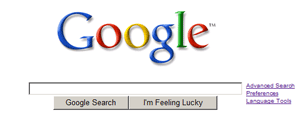
While the Advanced Search feature provides a variety of search options for both the basic service, a file format that we want to search, language, region, etc..


In fact still very much a search feature that we can use, but there is no menu option on the Advanced Search. In other words we must memasukannya query in the search form directly in the Basic Search. Nah perm
ainan query and search operators that this will in fact we in this article.
BASIC FEATURES SEARCH
1. AND: Search for information that contains both the word search. Can use one of the following three alternatives: ainan query and search operators that this will in fact we in this article.
BASIC FEATURES SEARCH
Jepara carving
Jepara carving AND
Jepara carving +
2. OR: Search for information that contains one of the two words. Can use one of two alternatives follows:
OR know where
know | Tempe
3. Phrases: Search for information containing phrase to search using the sign "." Example:
"Software"
4. NOT: The search results contain that word in front of, but not behind the minus (-). Example below will search for information that contain the word fish, but not milk.
fish-milk
5. Synonyms (~): Search for the word beser
ta-sinonimnya synonyms. The examples below will bring results: vehicle (car) and the synonym
6. ASTERIK (*): The character of the word. From the examples below, the results can be obtained: grilled spicy chicken, spicy fried chicken, baked chicken, spicy, etc. * spicy chicken
7. ALERTS TITIK (.): The characters of letters, numbers and single characters. From the examples below, the results can be obtained: coffee, chef, score, etc.
ko.i
8.
CASE insensitive: Search on Google and not the capital stock as the same thing. So, Romi Satria Wahono, Romi Satria Wahono, or Romi SATRIA Wahono will bring the same results
9.
NEGLIGENCE PREFACE: Google ignores keyword form of single characters and words: a, about, an, and, are, as, at, b, by, from, how, i, in, is, it, of, on, or , that, the, this, to, we, what, when
, Where, which, with. If we still want the search word, we can use the + character in front of the word search (example: Star Wars Episode + I), or can be also considered as a phrase (example: "Star Wars Episode I")
10.
I'm Feeling Lucky: It will take us directly to the first search results of queries we
SEARCH FEATURES NEXT
1. Define: Search for a definition of a terminology. From the examples below, the results obtained are various definitions of e-learning from various sources
define: e-learning
2. Cache: Showing a web site that has been indexed by Google already, although no longer active. Example below will generate a word search on the php site ilmukomputer.com in the Google index. cache: ilmukomputer.com php
3. LINK: Displays a list of links that point to a site. Example below will display a list of links that to the site ilmukomputer. link: ilmukomputer.com
4. RELATED: Displays a list of similar sites, or have a similar relationship with a related: romisatriawahono.net
5. INFO: Displays the information that Google know about a site info: romisatriawahono.net
6. SITE: Showing special searches in a site designated java site: ilmukomputer.com
7. Filetype: Displays search results as a type (extension) files. Types of files that can be are: doc, xls, rtf, swf, ps, lwp, wri, ppt, pdf, mdb, txt, etc.. Example below will display search results as PDF file that contains the keyword software engineering software engineering filetype: pdf
8. ALLINTITLE: Displays all the search words in the TITLE page. Example below will produce page that has a title java programming. allintitle This can not be combined with operator others. Intitle use for such purpose. allintitle: java programming
9. Intitle: Showing a word sought in the TITLE page. Example below will produce a page that a title and contents of the java page that contains the word enterprise intitle: java enterprise.
10. ALLINURL: Displays all the search words in the URL. Example below will generate a list of that contain the word java and programming. allinurl This can not be combined with operator (syntax) others. Inurl use for such purpose. allinurl: java programming
11. Inurl: Displaying a word is searched in the URL. Example below will generate a list of URLs that contain the word java and content of the page that contains the word enterprise inurl: java enterprise .
That we do will be more effective when we try to combine some of your service both in the search feature and basic information. For example, we want to search PDF files on the site www.pdii.lipi.go.id. Then we combine the two into the service:
filetype: pdf site: www.pdii.lipi.go.id
Jepara carving AND
Jepara carving +
2. OR: Search for information that contains one of the two words. Can use one of two alternatives follows:
OR know where
know | Tempe
3. Phrases: Search for information containing phrase to search using the sign "." Example:
"Software"
4. NOT: The search results contain that word in front of, but not behind the minus (-). Example below will search for information that contain the word fish, but not milk.
fish-milk
5. Synonyms (~): Search for the word beser
ta-sinonimnya synonyms. The examples below will bring results: vehicle (car) and the synonym
6. ASTERIK (*): The character of the word. From the examples below, the results can be obtained: grilled spicy chicken, spicy fried chicken, baked chicken, spicy, etc. * spicy chicken
7. ALERTS TITIK (.): The characters of letters, numbers and single characters. From the examples below, the results can be obtained: coffee, chef, score, etc.
ko.i
8.
CASE insensitive: Search on Google and not the capital stock as the same thing. So, Romi Satria Wahono, Romi Satria Wahono, or Romi SATRIA Wahono will bring the same results
9.
NEGLIGENCE PREFACE: Google ignores keyword form of single characters and words: a, about, an, and, are, as, at, b, by, from, how, i, in, is, it, of, on, or , that, the, this, to, we, what, when
, Where, which, with. If we still want the search word, we can use the + character in front of the word search (example: Star Wars Episode + I), or can be also considered as a phrase (example: "Star Wars Episode I")
10.
I'm Feeling Lucky: It will take us directly to the first search results of queries we
SEARCH FEATURES NEXT
1. Define: Search for a definition of a terminology. From the examples below, the results obtained are various definitions of e-learning from various sources
define: e-learning
2. Cache: Showing a web site that has been indexed by Google already, although no longer active. Example below will generate a word search on the php site ilmukomputer.com in the Google index. cache: ilmukomputer.com php
3. LINK: Displays a list of links that point to a site. Example below will display a list of links that to the site ilmukomputer. link: ilmukomputer.com
4. RELATED: Displays a list of similar sites, or have a similar relationship with a related: romisatriawahono.net
5. INFO: Displays the information that Google know about a site info: romisatriawahono.net
6. SITE: Showing special searches in a site designated java site: ilmukomputer.com
7. Filetype: Displays search results as a type (extension) files. Types of files that can be are: doc, xls, rtf, swf, ps, lwp, wri, ppt, pdf, mdb, txt, etc.. Example below will display search results as PDF file that contains the keyword software engineering software engineering filetype: pdf
8. ALLINTITLE: Displays all the search words in the TITLE page. Example below will produce page that has a title java programming. allintitle This can not be combined with operator others. Intitle use for such purpose. allintitle: java programming
9. Intitle: Showing a word sought in the TITLE page. Example below will produce a page that a title and contents of the java page that contains the word enterprise intitle: java enterprise.
10. ALLINURL: Displays all the search words in the URL. Example below will generate a list of that contain the word java and programming. allinurl This can not be combined with operator (syntax) others. Inurl use for such purpose. allinurl: java programming
11. Inurl: Displaying a word is searched in the URL. Example below will generate a list of URLs that contain the word java and content of the page that contains the word enterprise inurl: java enterprise .
That we do will be more effective when we try to combine some of your service both in the search feature and basic information. For example, we want to search PDF files on the site www.pdii.lipi.go.id. Then we combine the two into the service:
filetype: pdf site: www.pdii.lipi.go.id
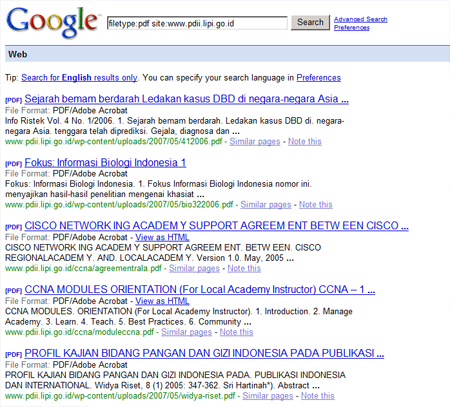
we know about this one, we advanced after playing with various Google search service.
REFERENCES:
1. http://www.google.com/intl/en/help/basics.html
2. http://www.google.com/intl/en/help/operators.html
3. http://www.google.com/intl/en/help/cheatsheet.html
How to Web Design With Success
Design experts say "Webdesign is not art". Why is that? Because the results of the paper is a compilation of results from different skill mix and a picture and layout. Unity of all these elements not only generate an aesthetics of fun but also can establish an interactive communication facilities, and also the ease of access to web content.
Well this is the time of need webdesigner "Strategy". A strategy where we have to combine ideals or expectations to an organization in a design.
Design of a smart and folus not only look fantastic or ngetrend. But the focus should be the goal of the web is made. For example: A web-selling computer game or community will dibanjiri files look better image. A blog contains opinions / personal experiences with the design should not wahh .. that can be made with a simple enough with a little color as long as the unique, lightweight and easy to explore and comment on blogs.
Implementation of Design Webmaster
We can use the 6 steps below as part of a design strategy in the web:
1. Goal Setting A Web
One of which must be dipastikn when mengerjalan a job webdesain is the final goal of the owner of the web. Do you want to achieve when the want a new web or web redesain? What are the main tjuan from the web. If your client was not yet know about it. Then you should sit together to discuss and define the meaning of web design have been made.
Remember! That website is not part of an art, but it is a view that holds the functions of a server. Function is to mean: to sell products, news, entertainment, sports, diary, community etc.. Specific to the work re-design (redesign), do ask why? A new face, increase the number of visitors, inviting user participation, increase the number of users who do register.
2. Identify the target audience who see
Who disasar as a very prospective visitors to look and function of a web. There are several aspects that affect the design of web design, such as age, gender, and professional competence. For example, the website containing the game for very young people who require the design "wow" with the rule that more detail is given the user audiencenya intelligent.
Three over the web (and jQuery.com Disney.com) changed appearance, the market will be adjusted to the web.
3. Defining a Brand from the web
Many webdesigner using a shortcut to find the inspiration that is based on the design of the existing trends. Button glossy, gradient and reflection effects can be very suitable for some web. But so can not match the Brand that are carried.
Reflect the color, the feeling that there will be need to give proper strength to Brand web.
Web Carbonica above aim to reduce emissions of carbon invites. Beautiful, the designer using the image texture and recycle the paper. Color is also taken from the earth colors of green and brown.
Design restaurantica aim to be a visitor in the restaurant serasa with segal pernak-perniknya.
4. Goal End Design
You already know the web functionality, creating a target, identify potential users and set the brand. Pertanyaanya is; How mmembuat design consistent with your strategy? Easily see the following example:
* The main purpose is interesting to register the user (Subscriber) in to our web design. But at least there are 3 steps to support the target:
1. Please shorten the text or caption. Do not use language so that detail is too confusing visitors.
2. Perjelas button or the 'register' with a special color or image, so it's easy to be found.
3. Consider the items of registration. Prospective applicants only fill an important key-only. For more detail form can be done when it is registered at a later time.
How do I implement a design strategy for the brand and the audience? If the website focus on the 'entertainment' then create a design that 'experience'. Free to use lots of color and image to menajamkan design. If the web is created to focus the delivery of information such as blogs, or magazines. Then make the efficient and interesting. Navigate confusing and not clear.
Stubmatic (online ticket service) as the image description. Sign-up page on all pages.
TechCrunch (technologi blog) with the ideal setting
4. Target Analysis Tool
Web already and can be enjoyed. This time nuntuk see the target or measure success. If you want to register a user as much as possible, then see the change when the design was changed. If that is a blog, please check the RSS statistics. If you want to know the degree of interaction with visitors, see how many posting comments or feedback that made the post.
You can use Google Analytics to help you to analyze a web kesusksesan.
5. Kaizen
A philosophy of Japan, namely kai meaning change and zen means good. Continuous Improvement is the core of Kaizen. When working in the web world, we should think that that is terpublish no final version. We will always make ongoing improvements to perfect. The idea of the improvement can be our own and can also encompass input from visitors.
Hopefully useful!
Take the pdf here: strategy-web-design
Related Articles
1. Open Website Color Combinations
2. Web Design 2 Column Flexible
3. Step By Step Becoming Programmer Handal Dengan Vb.Net (12)
4. Create Simple rekursi Hit Counter with PHP
5. Determining RGB Color Values with WhatColor
6. Make Pop Up Alternative To Web
7. Basic Knowledge To Become Web Designer
8. How do I start to learn Graphic Design?
9. Multimedia Instructional Design - 3. Interface Design
10. Login Make Page with PHP
11. Web Designing Tips captivate (1)
12. Postfix configuration with BitDefender Antivirus
13. Developing E-Learning Portal
14. Windows Backup and Restore with Norton Ghost
15. With Web Mempercantik Slick RSS module Joomla CMS
16. Keyboard Shortcuts for Photoshop
17. Importance of Communication With Site Visitors We
18. Getting Traffic From Classified Ads
19. Hidden Tricks User Search
20. Make a Shell Context Menu to register / UnRegister ActiveX Object
Well this is the time of need webdesigner "Strategy". A strategy where we have to combine ideals or expectations to an organization in a design.
Design of a smart and folus not only look fantastic or ngetrend. But the focus should be the goal of the web is made. For example: A web-selling computer game or community will dibanjiri files look better image. A blog contains opinions / personal experiences with the design should not wahh .. that can be made with a simple enough with a little color as long as the unique, lightweight and easy to explore and comment on blogs.
Implementation of Design Webmaster
We can use the 6 steps below as part of a design strategy in the web:
1. Goal Setting A Web
One of which must be dipastikn when mengerjalan a job webdesain is the final goal of the owner of the web. Do you want to achieve when the want a new web or web redesain? What are the main tjuan from the web. If your client was not yet know about it. Then you should sit together to discuss and define the meaning of web design have been made.
Remember! That website is not part of an art, but it is a view that holds the functions of a server. Function is to mean: to sell products, news, entertainment, sports, diary, community etc.. Specific to the work re-design (redesign), do ask why? A new face, increase the number of visitors, inviting user participation, increase the number of users who do register.
2. Identify the target audience who see
Who disasar as a very prospective visitors to look and function of a web. There are several aspects that affect the design of web design, such as age, gender, and professional competence. For example, the website containing the game for very young people who require the design "wow" with the rule that more detail is given the user audiencenya intelligent.

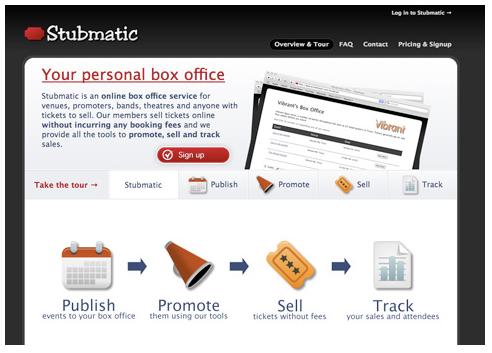
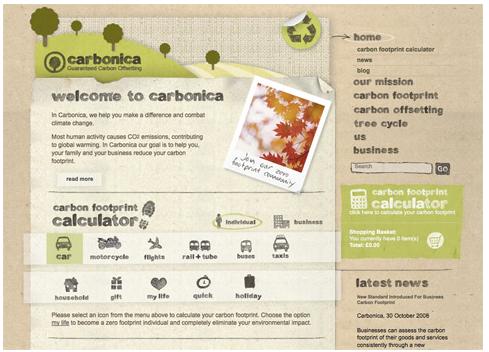
Three over the web (and jQuery.com Disney.com) changed appearance, the market will be adjusted to the web.
3. Defining a Brand from the web
Many webdesigner using a shortcut to find the inspiration that is based on the design of the existing trends. Button glossy, gradient and reflection effects can be very suitable for some web. But so can not match the Brand that are carried.
Reflect the color, the feeling that there will be need to give proper strength to Brand web.
Web Carbonica above aim to reduce emissions of carbon invites. Beautiful, the designer using the image texture and recycle the paper. Color is also taken from the earth colors of green and brown.
Design restaurantica aim to be a visitor in the restaurant serasa with segal pernak-perniknya.
4. Goal End Design
You already know the web functionality, creating a target, identify potential users and set the brand. Pertanyaanya is; How mmembuat design consistent with your strategy? Easily see the following example:
* The main purpose is interesting to register the user (Subscriber) in to our web design. But at least there are 3 steps to support the target:
1. Please shorten the text or caption. Do not use language so that detail is too confusing visitors.
2. Perjelas button or the 'register' with a special color or image, so it's easy to be found.
3. Consider the items of registration. Prospective applicants only fill an important key-only. For more detail form can be done when it is registered at a later time.
How do I implement a design strategy for the brand and the audience? If the website focus on the 'entertainment' then create a design that 'experience'. Free to use lots of color and image to menajamkan design. If the web is created to focus the delivery of information such as blogs, or magazines. Then make the efficient and interesting. Navigate confusing and not clear.
Stubmatic (online ticket service) as the image description. Sign-up page on all pages.
TechCrunch (technologi blog) with the ideal setting
4. Target Analysis Tool
Web already and can be enjoyed. This time nuntuk see the target or measure success. If you want to register a user as much as possible, then see the change when the design was changed. If that is a blog, please check the RSS statistics. If you want to know the degree of interaction with visitors, see how many posting comments or feedback that made the post.
You can use Google Analytics to help you to analyze a web kesusksesan.
5. Kaizen
A philosophy of Japan, namely kai meaning change and zen means good. Continuous Improvement is the core of Kaizen. When working in the web world, we should think that that is terpublish no final version. We will always make ongoing improvements to perfect. The idea of the improvement can be our own and can also encompass input from visitors.
Hopefully useful!
Take the pdf here: strategy-web-design
Related Articles
1. Open Website Color Combinations
2. Web Design 2 Column Flexible
3. Step By Step Becoming Programmer Handal Dengan Vb.Net (12)
4. Create Simple rekursi Hit Counter with PHP
5. Determining RGB Color Values with WhatColor
6. Make Pop Up Alternative To Web
7. Basic Knowledge To Become Web Designer
8. How do I start to learn Graphic Design?
9. Multimedia Instructional Design - 3. Interface Design
10. Login Make Page with PHP
11. Web Designing Tips captivate (1)
12. Postfix configuration with BitDefender Antivirus
13. Developing E-Learning Portal
14. Windows Backup and Restore with Norton Ghost
15. With Web Mempercantik Slick RSS module Joomla CMS
16. Keyboard Shortcuts for Photoshop
17. Importance of Communication With Site Visitors We
18. Getting Traffic From Classified Ads
19. Hidden Tricks User Search
20. Make a Shell Context Menu to register / UnRegister ActiveX Object
Subscribe to:
Posts (Atom)